InPage Keyboard Layout
ان پیج کی بورڈ لے آؤٹ
The full InPage Urdu keyboard: every key on its own and with Shift, including hamza and erab. Print it for your desk, or practise on it with the Urdu typing tool. To convert text you have already typed, use the InPage to Unicode converter or the Unicode to InPage converter.
Download PDF (A4) Download image (PNG)
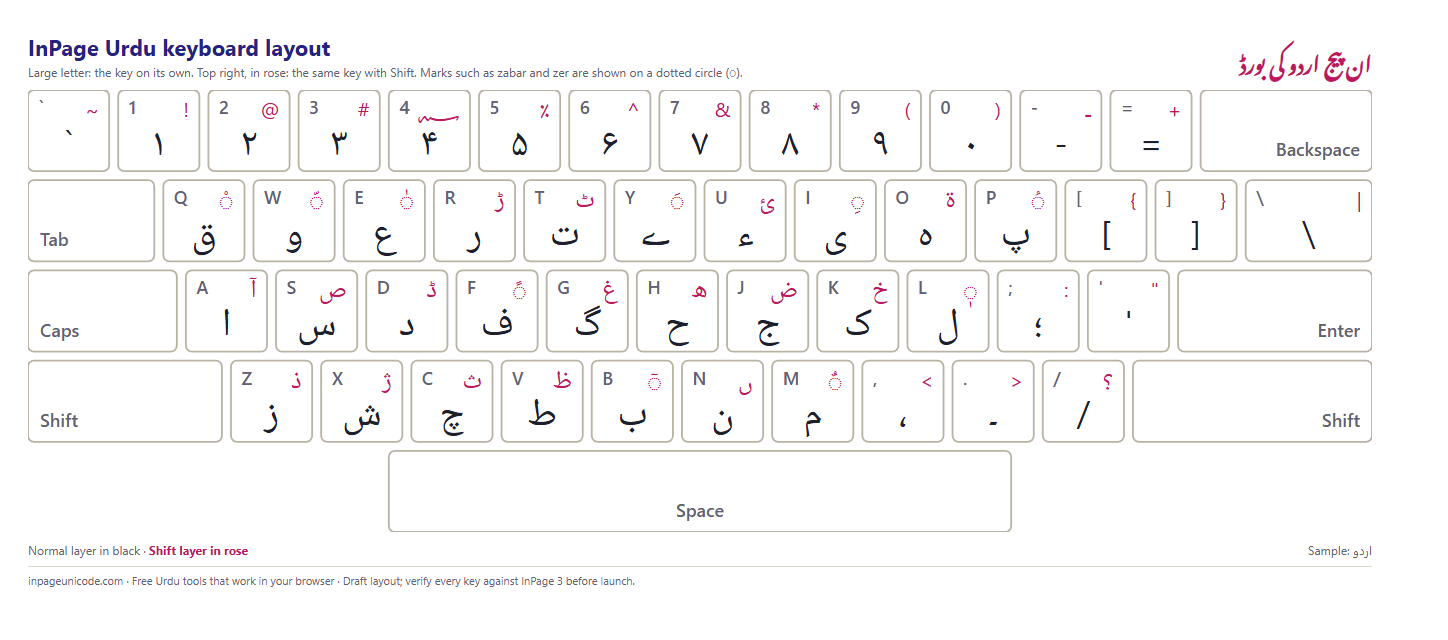
Every key, normal and Shift
| Key | Normal | Shift |
|---|---|---|
| ` | ` | ~ |
| 1 | ۱ | ! |
| 2 | ۲ | @ |
| 3 | ۳ | # |
| 4 | ۴ | |
| 5 | ۵ | ٪ |
| 6 | ۶ | ^ |
| 7 | ۷ | & |
| 8 | ۸ | * |
| 9 | ۹ | ( |
| 0 | ۰ | ) |
| - | - | ـ |
| = | = | + |
| Q | ق | ◌ْ |
| W | و | ◌ّ |
| E | ع | ◌ٰ |
| R | ر | ڑ |
| T | ت | ٹ |
| Y | ے | ◌َ |
| U | ء | ئ |
| I | ی | ◌ِ |
| O | ہ | ۃ |
| P | پ | ◌ُ |
| [ | [ | { |
| ] | ] | } |
| \ | \ | | |
| A | ا | آ |
| S | س | ص |
| D | د | ڈ |
| F | ف | ◌ً |
| G | گ | غ |
| H | ح | ھ |
| J | ج | ض |
| K | ک | خ |
| L | ل | ◌ٖ |
| ; | ؛ | : |
| ' | ' | " |
| Z | ز | ذ |
| X | ش | ژ |
| C | چ | ث |
| V | ط | ظ |
| B | ب | ◌ٓ |
| N | ن | ں |
| M | م | ◌ٌ |
| , | ، | < |
| . | ۔ | > |
| / | / | ؟ |
Hamza and erab keys
Marks go after the letter they sit on. To write بَ, press B and then Shift+Y. Tashdeed and a vowel mark can be stacked: اللّٰہ is A, L, L, Shift+W, Shift+E, O.
- Zabar, zer, pesh: Shift+Y, Shift+I, Shift+P.
- Tashdeed, jazm, khari zabar: Shift+W, Shift+Q, Shift+E.
- Tanween: Shift+F (do zabar), Shift+M (do pesh).
- Hamza: U gives ء, Shift+U gives ئ. Shift+O gives ۃ, Shift+A gives آ.
اعراب ہمیشہ حرف کے بعد لکھے جاتے ہیں۔ زبر، زیر اور پیش کے لیے شفٹ کے ساتھ Y، I اور P دبائیں۔ ہمزہ U کی پر ہے۔
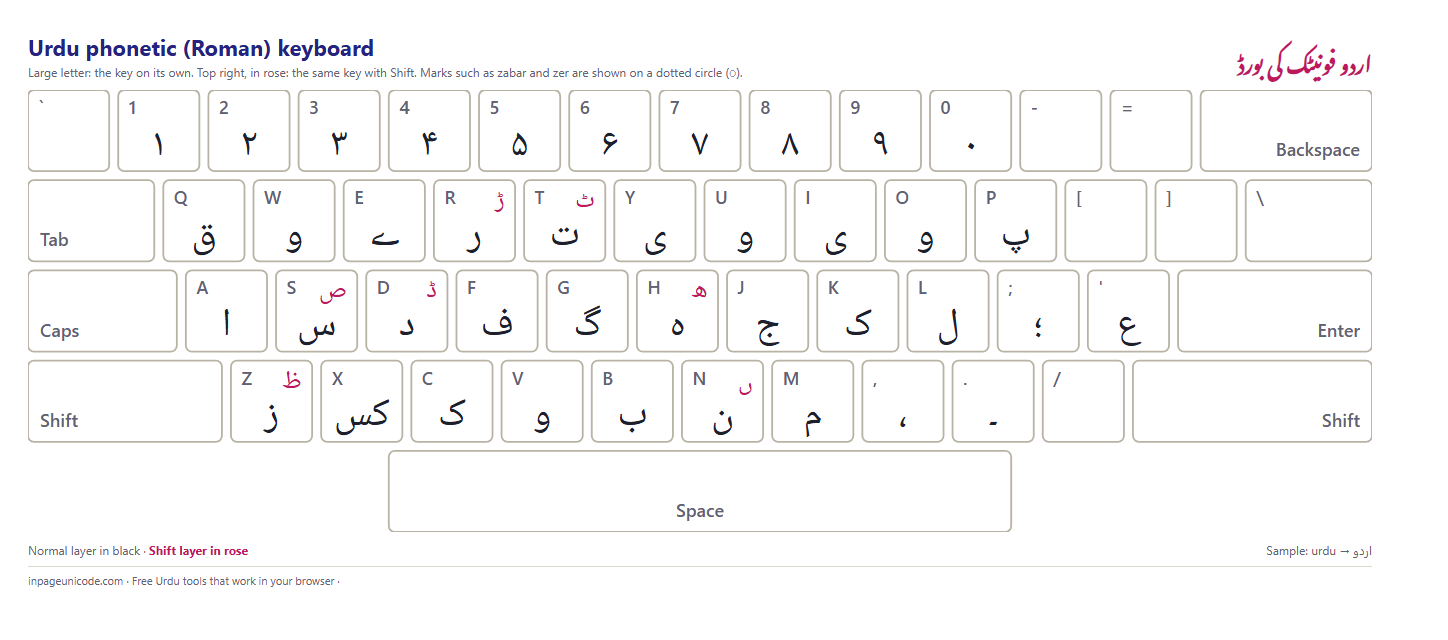
Phonetic (Roman) layout
The typing tool's Phonetic mode maps Roman letters to Urdu. This chart shows what each key gives on its own and with Shift.

Questions سوالات
Is this the same layout as InPage 3?کیا یہ وہی لے آؤٹ ہے جو ان پیج ۳ میں ہے؟
It follows the Urdu phonetic keyboard that InPage 3 uses by default, with letters placed on the English keys that sound alike. Some offices use a customised key map; if a key on your machine produces a different letter, InPage's own keyboard settings are the final word.
یہ ان پیج ۳ کے فونیٹک کی بورڈ کے مطابق ہے جس میں اردو حروف ملتی جلتی آواز والی انگریزی کیز پر ہیں۔ اگر آپ کے دفتر کا کی بورڈ الگ ہو تو ان پیج کی اپنی سیٹنگ کو درست مانیں۔
How do I type hamza and erab on the InPage keyboard?ان پیج کی بورڈ پر ہمزہ اور اعراب کیسے لکھیں؟
Hamza (ء) and ئ sit on the U key and Shift+U. The erab marks are on Shift with the vowel keys: zabar on Shift+Y, zer on Shift+I, pesh on Shift+P, and tashdeed on Shift+W. Type the letter first, then the mark.
ہمزہ U کی پر ہے۔ اعراب شفٹ کے ساتھ ہیں: زبر Shift+Y، زیر Shift+I، پیش Shift+P اور تشدید Shift+W۔ پہلے حرف لکھیں پھر اعراب۔
Can I print the keyboard layout?کیا کی بورڈ لے آؤٹ پرنٹ ہو سکتا ہے؟
Yes. Download the A4 PDF, which has the normal and Shift layers on one landscape page, or press Print on this page. Ads, menus and the footer are hidden when printing, so only the layout comes out.
جی ہاں۔ اے فور پی ڈی ایف ڈاؤن لوڈ کریں جس میں دونوں تہیں ایک صفحے پر ہیں، یا اسی صفحے پر پرنٹ کا بٹن دبائیں۔
Do I need to install anything to type with this layout?کیا اس لے آؤٹ کے لیے کچھ انسٹال کرنا پڑتا ہے؟
Inside InPage, no: the layout is built in. To type Urdu with the same keys in other programs you need an Urdu phonetic keyboard in Windows, or you can use our online Urdu typing tool, which uses this exact layout in the browser.
ان پیج کے اندر نہیں، یہ پہلے سے موجود ہے۔ دوسرے پروگراموں میں اسی طرح لکھنے کے لیے ونڈوز میں اردو فونیٹک کی بورڈ لگائیں یا ہمارا آن لائن اردو ٹائپنگ ٹول استعمال کریں۔
More Urdu tools
Last updated: 29 September 2026